Help Your Brand Stand Out with Professional Google My Business Photos
Improve your Google My Business photos and stand out from the crowd when consumers are choosing between businesses like yours.



If you’ve browsed Google My Business photos recently, you may have noticed a lack of quality. You often see street views, parking lot shots, and odd angles that certainly don’t put the businesses’ best foot forward. Most of these photos are either generated by Google street view cameras or your customers, and if you're lucky, there is some identifiable branding.
On the other end of the spectrum, there are the professional studio photos. Google My Business listings are full of shots of food and drink, racks of clothing, and models sporting the latest accessory. And what’s more, each location often has the same exact photos of the other locations. These types of photos are better than nothing, but in the end, they’re just filler. Consumers can tell when photos are seemingly perfect and “touched up,” and in general they don’t display the authentic, local brand experience that most consumers expect.
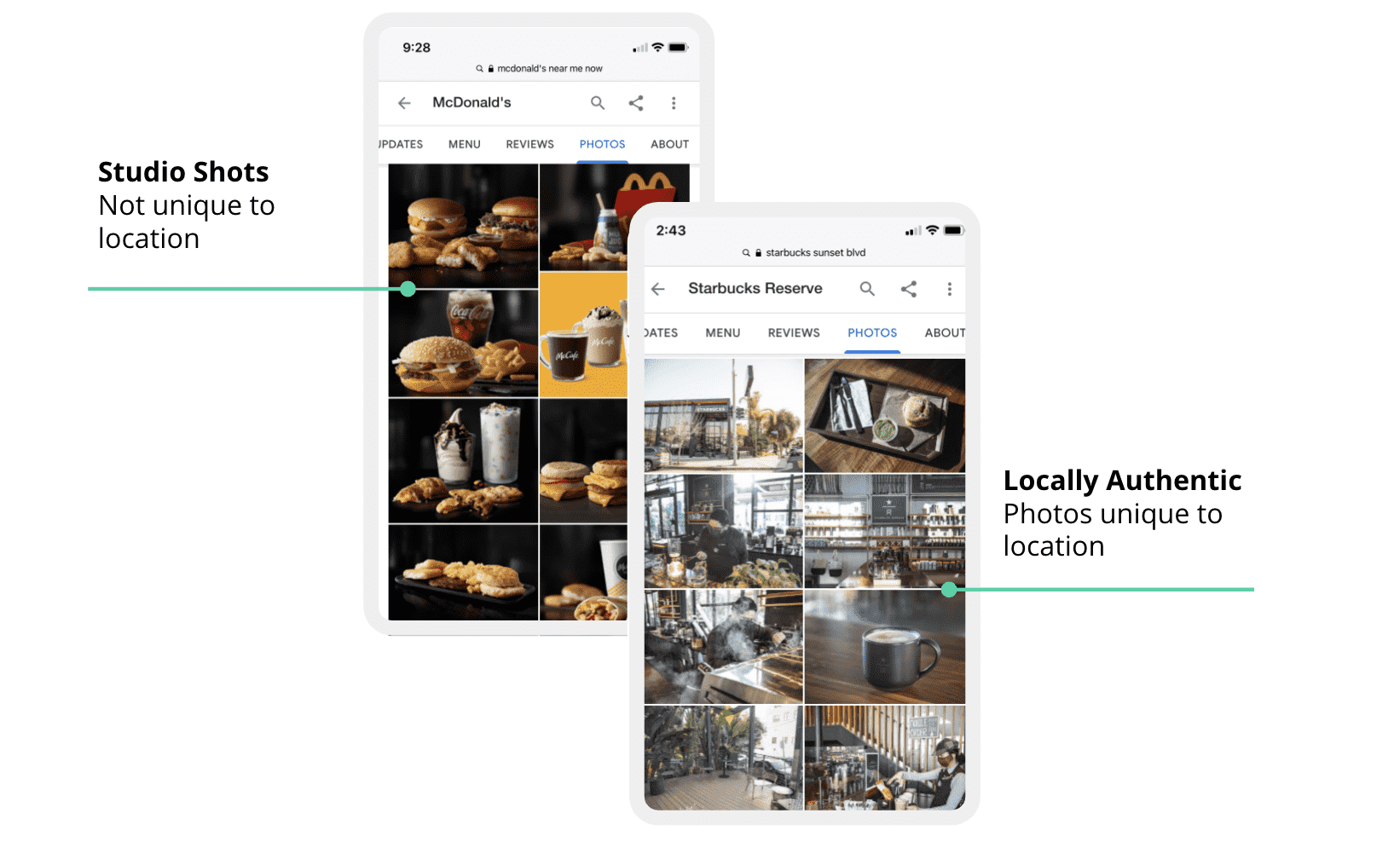
While you can't control your brand image on every photo that appears on Google (outside of requesting the removal of irrelevant or offensive photos), it’s important for a brand to address quality.
These subpar images represent a huge opportunity in the hyper-competitive world of location-based marketing. A business that’s willing to put the extra effort into uploading quality images will make a much better impression, especially when a customer is deciding between two or three businesses. In fact, research shows that businesses with at least one Google My Business photo receive 42% more requests for directions and 35% more clicks to websites than those without photos.
And the more photos, the better – businesses with over 100 images get:
- 2,717% more direction requests than average
- 1,065% more website clicks
- 960% more search views
- 3,459% more map views
However, don’t just add images for the sake of adding images. According to BrightLocal, 60% of customers feel drawn toward listings that have appealing, high-quality locally relevant photos. This comprehensive guide explores best practices for Google My Business photos to help your business stand out and gain a competitive edge.
7 Best Practices for Google My Business Photos
Your Google My Business photos don’t have to be perfect, but they should showcase the local brand experience guests can expect when visiting your business. Here are seven Google My Business photo best practices to help your brand stand out when consumers are choosing between businesses like your:
1 - Use Quality Images - Make sure your images adhere to Google’s recommended photo requirements, including:
- Format: JPG or PNG
- Size: 10 KB to 5 MB
- Resolution: 720 pixels by 720 pixels
All photos should be clear and well-lit. Avoid the use of fancy filters or extreme edits, which may come across as doctored and make it more difficult for audiences to trust your business. Your goal is to capture the genuine local experience of visiting your store.

2 - Choose the Right Cover Photo - Find the image that best represents your business and choose it as your Google My Business cover photo. In the example below, Starbucks chose a picture that features the main attribute (drive-thru) of its location. This will usually show up as the lead image when people view your page. The ideal Google My Business cover photo size is 1024x576 pixels. A photo of this size will show up as a 16:9 aspect ratio, which means the proportions will be perfect for your header image.

3 - Optimize for Local SEO - Google My Business photos need to appeal to audiences and web crawlers alike. When you post, make sure to:
- Use high-resolution images. Google’s recognition engine won’t pick up on blurry or unidentifiable images.
- Add keywords to your file names, image tags, and meta descriptions.
- Geotag your photos.Go to tool.geoimgr.com in your browser and add the latitude and longitude of your location.
4 - Add Images in All Categories - Google My Business categorizes photos, with some variations by industry. Restaurants for example often have a “menu” and “vibe” category, whereas retailers often have a “products” category. Google recommends you have at least three in each of the below categories:
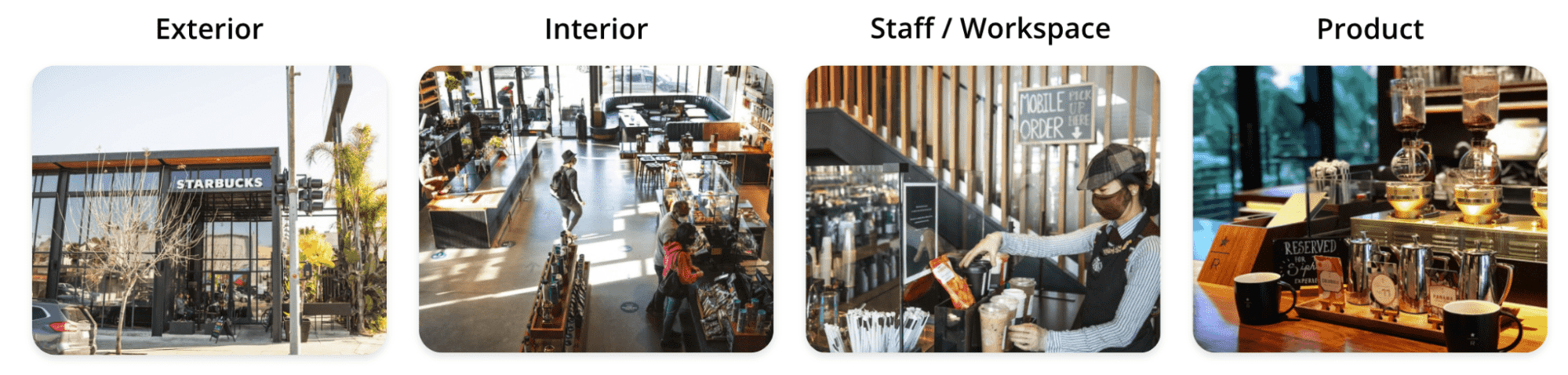
- Exterior photos help customers recognize your business from different angles. Choose an image people will recognize from the street. A direct view of the storefront and an approach from the sidewalk are great places to start.
- Interior photos offer customers a sense of your atmosphere and ambiance. Grab some pictures of your best displays. Broad views of your entire store work well too.
- Product and service photos preview what you offer and entice people to get their hands on the merchandise. A clothing store might showcase a rack of new dresses, while a hair salon might have “after” photos of clients’ cuts and up-dos.
- Food, drink, and menu photos if you are a business in the food services industry showcase your menu and create a desire to try your offerings. Beautifully presented entrées, frothy pints of beer, and hot pizzas are all great – just be sure they’re accurate and unique to your business.
- Staff photos show people who are ready and willing to assist customers. Think of a smiling cashier or a staff member helping a customer reach a product.
5 - Add New Photos Regularly – Your Google My Business profile should always feel relevant to audiences. Update them often, making sure you touch on the following aspects:
- Professionally taken photos. Pro photographers know how to get the right angles and lighting while still making it feel authentic and true to the local brand experience.
- An authentic local look. Don’t use photos from a different location, even if they look similar. Embrace the aesthetic you’ve cultivated for each of your locations.
- No pre-remodel photos. The photos you post should reflect the business’s current aesthetic.
- Timely images. In early 2021, photos of team members in masks look timely and reflect a commitment to customer safety. Things might look different six to 12 months down the road. Go through your photos often to ensure they don’t feel dated.
6 - Monitor User-Generated Photos and Request Removal if they Violate Policies – Poor-quality customer photos are frustrating. Google won't take user photos down just because they're not very good, but you can ask for a picture's removal if one of the following applies:
- The picture violates Google Maps’ photo policies (if the photo is irrelevant, dramatically altered, excessively blurry, etc.)
- The image falls into a prohibited and restricted content category (e.g., illegal, fake, offensive, or misrepresented material)
To request removal, you just need to flag an image by clicking or tapping on it from within your Google My Business account. In addition, by posting more of your own location photos you can ensure a positive local brand image to counter any poor quality user-generated photos.
7 - Shoot Once, Publish Across the Web – While Google My Business is easily the most important location-based discovery network for publishing quality images that reflect your local brand, why stop there? Once you have strong photos that represent your local brand image, go ahead and publish to other popular location-based networks, including Facebook, Yelp, Bing, Apple Maps, Google Maps, and Tripadvisor – just to name a few.
Uberall Makes Professional Location Photos Easy
Uberall knows that arranging for professional photos at every one of your locations isn’t an easy task. That’s why we offer a professional photo service, geared toward multi-location businesses. Our new Enhanced Local Photos offering and process lets you be as hands-on as you want, without overwhelming you with options.
For each brand store location, the Enhanced Local Photos offering delivers professionally shot local photos, optimized for best practices and SEO, and provides:
- A dedicated photo account manager
- Photo brief shot list development
- Arrangement of local photographers
- Professional photo recommendations for each location
- Automatic photo loading and publishing to a brand’s listings for each of its locations



1,800 brands trust us to stay visible
— not just show up once or twice in local search.