How to Choose the Right GEO Tool for Multi-Location Businesses When Every Vendor Sells AI Visibility
The vendor demo now opens with a ChatGPT screenshot. Here’s how to choose a local SEO service that covers listings today and AI visibility tomorrow — and what to ask before you sign.

Key takeaways
- Write down what you need from a local SEO service today and what you’ll need in 18 months before you watch a demo
- AI visibility platforms are priced on usage, so the only comparable number across quotes is cost per AI answer per month
- A vendor who doesn’t ask about your locations, your data source, or who will be using the tool is quoting their default package, and you’ll find out what’s not included after you sign

A multi-location brand we spoke with had paid their vendor for local pages for years before finding out an agency the vendor never mentioned was building them, at a markup. Their word for it was “lack of transparency.” That’s why they started looking for alternatives.
You should be asking your vendor to confirm in writing which features come without extra cost.
This is even more relevant if you’re after an AI visibility tool to add to — or replace — your current stack. Because AI visibility tools aren’t priced like SEO platforms. They run on credits consumed per prompt, per model, per day — and “150 prompts” can mean different things with different tools.
If you run SEO or GEO for a multi-location brand, you’re probably the one comparing offers and then defending your pick to your CMO or other stakeholders who ask about data accuracy, analytics, price (and ROI).
This is what we’d tell you to look at.
What Are the Best Tools to Audit AI Visibility?
The age-old much-loathed answer is: It depends. It’s worth understanding what kind of AI visibility tools are out there, because the “best tool” depends on what kind of brand you are and what kind of solution you’re after.
The market breaks down roughly like this:
- Standalone AI visibility tools like Peec and Profound offer the deepest analytics; Profound covers nine models and has built a whole certification program around AEO. Both now support location-specific tracking, and Profound also offers persona-level analysis — so the brand-level-only limitation no longer applies. Neither manages listings or reviews. Profound also offers agents that can identify content gaps, create and optimize content, and publish it through connected CMS workflows.
- SEO tools with add-on AI modules — Semrush and Ahrefs (Brand Radar) bring comprehensive keyword and backlink data to the table, and both now track AI visibility at individual prompt and geographic level. They don’t include persona-level tracking, meaning neither lets you see how different types of customers (e.g. “family looking for a hotel” vs. “business traveler”) find you differently across AI models.
- Listings and social platforms adding GEO — Birdeye, SOCi, and Partoo already sell listings management, reviews, or local social tools to multi-location brands. Birdeye launched its AI Search Optimization Agent in September 2026, so it’s now generally available — though it’s still early, so ask for case studies or results data from brands that have been using it beyond the beta. Partoo doesn’t build its own AI visibility measurement; it outsources that to a third-party partner called Meteoria, which means you’re contracting with two companies to get one view. SOCi combines AI visibility capabilities with its existing multi-location search, listings, reputation, and social marketing platform.
- Full-stack local GEO platforms — This is where you’ll find Uberall and Yext. Yext Scout is agentic with broad model coverage, and its Action Center turns Scout insights into actions across Yext products including Listings, Reviews, Social, and the Knowledge Graph. But it’s been described as premium-priced and complex to use. It runs four standardized query types per location across its AI engines to cover a range of local search scenarios, while also allowing users to add custom prompts tailored to their business.
Uberall’s GEO Studio tracks AI visibility at prompt, persona, and location level — you choose the prompts, define the personas, and see how each location performs against them individually. The Action Center generates and publishes AI-ready content directly to your CMS (WordPress, Webflow, Shopify). It sits alongside Uberall’s listings and reviews platform, so the monitoring and the fixing happen under the same roof, even though they’re separate products.
There’s no tool category that’s worlds better than the others. What’s “best” depends on how your business is set up. If you’re a single-location business or a brand without physical storefronts, a standalone monitoring tool like Peec or Profound could be all you need to get started quickly.
If you’re already using Semrush or Ahrefs for SEO, their AI modules get you started on your GEO strategy without needing to go through the hassle of adding another vendor.
The full-stack platforms are critical if you’re managing hundreds of locations and need AI visibility data connected to your multiple listings, reviews, and local content that actually influence it.
Local GEO — optimizing for location-based searches across AI tools — has gone from specialist to expected in the last year, and most tools in this space now offer some form of location-level tracking. But what really matters is knowing what they offer beyond tracking: Does the tool connect AI visibility data to your listings, reviews, and local content so you can act on it across locations? Or does it stop at reporting on your GEO metrics?
How Do I Compare GEO Tool Quotes Fairly?
When we published this article on local SEO services two years ago, the advice was: Compare local SEO services on data accuracy, analytics capabilities, and price. These are still all applicable, but now there’s another layer added on to each of the deciding factors:
- Data accuracy: Your business listings being correct across directories has never been more important. The new question is whether the same data is what AI models read when they recommend you — and whether your vendor can show you that it is.
- Analytics: Rankings and traffic still influence online visibility, but now you also need to know where you stand in AI answers, and whether the number your vendor shows you is reliable enough to act on. AI visibility platforms use different combinations of proprietary tracking, licensed datasets, and custom prompt monitoring, so ask each vendor where its data comes from and how its metrics are calculated. That means two vendors showing you different dashboards could be running on the same underlying numbers. So ask whether the data behind their analytics is proprietary or licensed from a shared source. If it’s shared, ask what their data science does on top of it that other vendors don’t.
- Price: Per-location fees often still apply. On top of that, you’re now comparing what each credit or token buys, which models are included, and what gets quoted separately as an add-on.
Most vendors will tell you they cover all three of these. You’ll see to what extent this is true or included when you ask them to put the specifics in writing.
1. Listings Data Is a Top Local Signal for AI Recommendations — Ask Whether Your Vendor Can Fix It and Track It
AI models pull from your listings information — Google Business Profiles (GBP), Yelp, Apple Maps, the major directories — plus your reviews and whatever local content is published under your brand. So if your hours are wrong on Google, or your categories don’t match across directories, or things are looking quiet on the review front, that’s what the model is reading when someone asks it to recommend a business like yours.
When Katya Shishchenko, our GEO/AEO analyst, looked at AI visibility across 120,000 AI mentions in five verticals, GBP completeness — descriptions, attributes, categories, photos — was among the strongest predictors of whether a location showed up in AI answers at all. In some verticals, completing profiles raised AI mention rates by 40 to 60 percentage points.
All this is to say why fixing listings accuracy and consistency will matter even more for multi-location businesses — especially at scale across hundreds or thousands of locations.
Standalone GEO tools monitor what models say about you — mention rates, ranking position, which competitors show up — but you’d need a separate tool to manage your listings, reviews, or local content if your location data is wrong or needs optimizing. Forrester’s AEO Technologies Landscape report lists listings management as a top differentiator for local AEO — and most standalone tools don’t offer it.
GEO Studio and Uberall’s listings management platform are separate products — separate contracts, separate tools. GEO Studio monitors your AI visibility; the listings platform manages your profiles across directories to help improve your AI visibility.
Tip: If GEO Studio shows you’re frequently missing from AI answers, you investigate and fix that in the listings platform, where all the context on your locations and data is centralized, not inside GEO Studio. You can audit which competitors are getting mentioned in GEO Studio — investigate their profile attributes, descriptions, categories, photo count, etc. — and optimize your listings across locations inside the Uberall platform.
2. Most GEO Tools Can Show You Location-Level Data — but Can They Help You Act on It at Scale?
Most tools in this space — including Profound, Semrush, Ahrefs, Peec, Birdeye, and Yext — now offer some form of geographic or location-specific AI measurement. That’s a good thing for buyers, because brand-level reporting alone was never enough for multi-location brands.
Knowing, for example, that your New York location gets recommended more than your Charlotte one is useful. But if the reason is that Charlotte’s GBP categories are wrong, its reviews are unanswered, and its local pages don’t exist. You’ll want to fix all of that — not spend time exporting a spreadsheet and logging into three other tools.
GEO Studio connects to the Uberall platform, where brands manage their listings, reviews, social posts, and local pages across over 1.4 million business locations.
GEO Studio lets teams track AI visibility at prompt, persona, and location level, then act on opportunities or errors they find through the listings and reviews platform — fix the listing, publish local content, respond to the review — without leaving the ecosystem.
The question worth asking any vendor isn’t whether they can show you location-level AI data — most can now. It’s whether they can help you do something about it across hundreds of locations without stitching together three different tools to get there.
3. Most GEO Products Are Usage-Based, So Make Your AI Tool Quote Specific to Your Needs
Local SEO services are priced per location, so it’s easy to compare two quotes for 300 locations. GEO platforms mostly don’t work that way.
GEO Studio, like most products in this category, runs on monthly credits that get consumed as you monitor prompts, track competitors, and run analyses.
Other vendors define a credit as one prompt run on one model on one day. Either way, the price on the page doesn’t tell you much until you know what one credit actually buys — and which capabilities are quoted separately. More models, more prompts per location, and custom prompt sets can increase pricing or credit consumption depending on the vendor and plan.
Ask every vendor to give you their quote with these variables:
- Prompts: How many are tracked, and can you change them mid-contract? Some vendors fix the prompt set for the contract term — adding more prompts would come as an add-on. Ask before you sign.
- Models: How many AI engines are covered — ChatGPT, Gemini, Perplexity, Claude, and so on — and which ones are included at the quoted price?
- Frequency: Does the tool track AI mentions and citations daily, weekly, or monthly? A prompt run daily costs roughly 30 times a prompt run monthly in any credit model.
- Locations: Is location-level tracking included, and does each location consume its own credits? For a 300-location brand, this is where things could get expensive.
Then ask what happens when credits run out mid-month — does tracking pause, does it bill overage, or do you receive a notification?
And think twice about multi-year contracts in a market this new. The tools are evolving fast. If a tool’s main value today is its AI visibility dashboard, you might not want to be locked into that two-year contract.
In any demo or conversation with a vendor, prepare these requests for them:
- “Does the tool fit into my existing workflows, or is it an extra layer on top?” A dashboard your team has to check separately from everything else they use is going to struggle with adoption. Ask how the tool connects to the platforms your team already works in — your CMS, your listings platform, your reporting stack. The less switching between tools, the more likely you’ll get your money’s worth.
- “Can I run a pilot before committing?” This market is new enough that what looks right in a demo may not fit once your team is using it daily. Ask for a pilot scoped to a subset of your locations and prompts before signing a full contract.
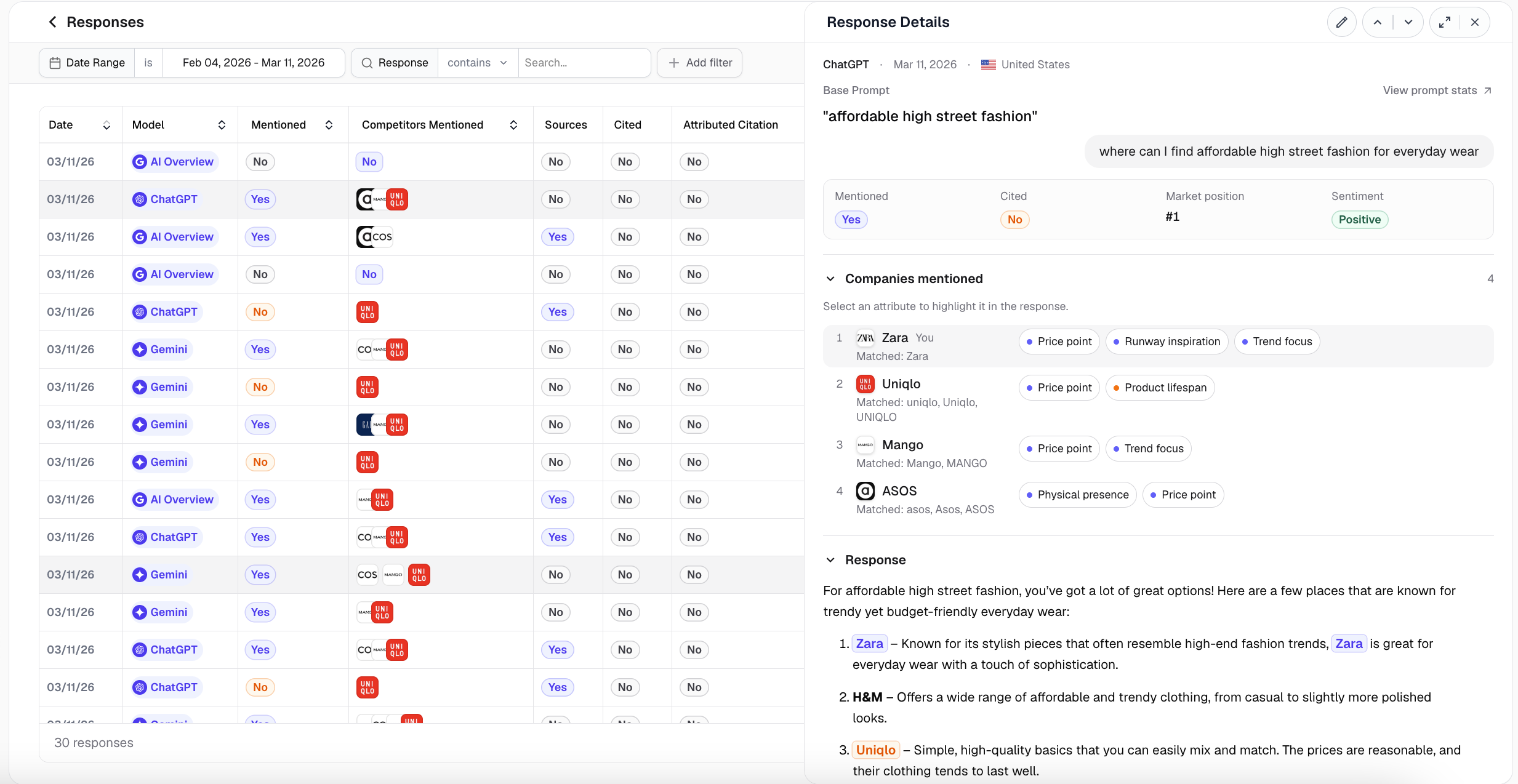
- “Can you show me the raw responses behind that mention rate?” Any credible AI visibility tool stores the actual AI answers. In GEO Studio you open Responses and Response Details and read what the model said (see the screenshot below). If a vendor can only show you the percentage, you can’t audit it.
- “What’s included without extra cost?” Local pages, schema, content creation, onboarding, additional AI model insights — ask for the full list before you sign.
- “What can I change from inside the platform?” Seeing that you’re missing from an AI response in ChatGPT is step one. A full-stack tool helps you fix your listing, publish FAQs with rich content, or answer the review that was used to compile the response.
- “How do you handle data privacy and compliance?” AI visibility tools scrape and store AI-generated responses that may reference your brand, your competitors, and your customers. If you operate in the EU, the AI Act’s transparency obligations under Article 50 went into effect in August 2026. Ask your vendor how their data sourcing complies with current regulations.
- “Who owns the data if I leave?” Ask whether you can export your historical prompt data, mention rates, and responses if you switch vendors.
Write Down What You Need Before An AI Visibility Tool Demo
If you’re figuring out how to choose an AI visibility tool, start with two lists before you talk to any vendor.
The first is what you need fixed right now — maybe that’s understanding how your locations show up in AI answers. The second is what you’ll be asked about in 18 months — the questions your leadership will bring up that you don’t necessarily have answers to yet. For example, “What are we doing to improve our locations’ AI visibility — and can we prove it’s working?”
Every demo you agree to should be able to answer today’s needs and those in 18 months’ time.
Some vendors might have the answers to the first list — the things you want to understand today (i.e. what AI models are saying about you) — but they can’t help you with what happens next. Optimizing for location-based searches across answer engines is not a core capability for most vendors, but Uberall is one of the few vendors recognized for it in Forrester’s AEO Technologies Landscape report.
We ask about objectives in our scoping calls before we quote GEO Studio, so the quote matches what you actually need — not a default package you’ll need add-ons for in 6 months.


1,800 brands trust us to stay visible
— not just show up once or twice in local search.




Frequently Asked Questions
Local SEO services are the work of making each business location findable when someone nearby searches for what it sells — listings management, citation building, review management, and local pages. Google ranks local results on relevance, distance, and prominence, and complete, accurate profiles feed all three. Since 2025, the same location data is also what AI models read before recommending a business, so local SEO services now serve two readers: Google and AI models.
Yes, you still need local search engine optimization services if you have a GEO tool. A GEO tool monitors how your locations appear in AI answers; it doesn't fix the data behind them. AI models pull from your Google Business Profiles, directories, reviews, and local pages — in our analysis of 120,000 AI mentions, profile completeness raised mention rates by 40 to 60 points in some verticals. Forrester lists listings management as a top local AEO differentiator, and most standalone GEO tools don’t offer it.
The best local SEO tools for multi-location brands in 2026 are the ones that connect AI visibility to the location data that drives it. Standalone trackers suit single-location or storefront-free brands; SEO suites with AI modules suit teams already using them; listings platforms with GEO add-ons suit their existing customers. Brands managing hundreds of locations need a full-stack local GEO platform where monitoring and fixing happen in one place.
The best tools to audit AI visibility fall into four categories: standalone AI visibility trackers, SEO suites with AI add-ons, listings and social platforms adding GEO, and full-stack local GEO platforms. Whichever you audit with, it should track at prompt, persona, and location level, show you the raw AI responses behind each mention rate, and tell you where its data comes from. We break down who each category works best for in the comparison table above.
You choose the right GEO tool for your business by writing two lists before any demo: what you need fixed today, and what leadership will ask about in 18 months. Then ask every vendor to restate their quote in comparable units — prompts, models, frequency, and locations — and to confirm in writing what’s included without extra cost. A vendor who doesn’t ask about your locations, data source, or users is quoting a default package. We ask those questions in scoping calls before quoting.
A multi-location brand should use a platform for the work that has to happen across hundreds of locations — listings, reviews, local pages — and an agency for strategy or capacity it can’t staff. What matters more than the label is transparency: Ask any provider to confirm in writing which features are included, who actually does the work, and whether you can export your data if you leave. One brand we spoke with found their vendor had quietly outsourced their local pages at a markup.