How to Build a Restaurant Menu That’s Optimized for Wherever Your Customers Are Searching
Discover how restaurant and QSR operators can turn their menus into a visibility and foot traffic engine across Google, AI search, and every platform where hungry customers are looking for their next meal.

Key takeaways
- If your menu only exists as an image or unstructured text, AI systems can’t read it, meaning you’re invisible when customers search for specific dishes or dietary needs
- Every menu item needs a clear name aligned with how customers actually search, a detailed description with ingredients and preparation, dietary/allergen tags, prices, and schema markup (Menu, MenuItem, MenuSection) so both search engines and LLMs can parse it
- AI models pull from Google, Yelp, TripAdvisor, delivery apps, and more — if pricing, availability, or descriptions conflict across those sources, the LLM will recommend a competitor with cleaner data instead
“I realized that [a business’] menu item was labeled ‘Caesar Kitchen’ instead of ‘Caesar Salad.’ Once they updated it to the correct keyword, their ranking improved dramatically.”

You're confident in your menu and service, but you're not confident in how to attract hungry customers searching for where to eat via ChatGPT or Gemini?
It's a valid concern, and you're taking the right steps by figuring this out early.
It's a valid concern because, as our GEO Playbook points out, an estimated $750 billion in consumer spend will flow through AI search and discovery in the next two years.
More than two in three brands are missing from AI recommendations, and almost nine in ten suffer inconsistent business information across AI models.
So, the sooner you, as a restaurant or QSR chain operator, figure out your strategy, the greater chance you'll have at not only driving visibility for your locations but also visits.
We've been working with Rev Ciancio, a big name in the hospitality marketing space, who claims that restaurant menu optimization is what most QSRs and restaurants are sleeping on right now. Well, the savvy brands are awake, and you can join them by building a menu optimized for wherever customers are searching for their next meal.
Why You Need to Look at Your Menu At All
"Write more blogs," "Post more on TikTok," "Run more social ads" — the ways in which you can drive better engagement and visibility for your restaurant locations are plenty. Established local ranking factors back these initiatives up.
But restaurant menu optimization is an initiative that remains very underutilized and unexplored from a GEO strategy perspective.
Yes, blog or website copy, schema or social media captions might help you appear in queries like "Burger restaurants near me" — but what about when customers search for specific dishes or dietary requirements such as "Gluten-free smash burger near me"? You can rarely cater to this specificity anywhere else but your menu.
Whether you have a handful or thousands of locations – your menu shouldn't be a static PDF. It should be your magnet for bringing in hungry, high-intent paying customers.
And to be a magnet attracting these customers from multiple angles, your menu needs to be understood by consumers, search engines, and AI systems.
Just remember: More than two in three local businesses are completely absent from AI results because their data is missing, outdated, or inconsistent. That's not a search problem or a Google algorithm problem — that's quite clearly a data problem, and it's fixable.
A GEO-optimized menu is structured, specific — and obviously enticing. It maximizes a restaurant's menu visibility as much as it helps attract actual foot traffic to your locations.
What Does a GEO-Ready Menu Look Like?
Maybe you optimized your Google restaurant menu on your Business Profile or your website before today. Maybe you didn't. That matters little now, because small and large restaurant brands alike can win extra visibility in local search results based on simple menu optimizations.
Back to our example from before, when a customer asks, "Where can I find a smash burger with a gluten-free bun near me?", AI systems don't simply look at your menu PDF; they look for structured data fields.
As Rev mentions in his newsletter: "If your menu only exists as an image or unstructured text, you're invisible to these searches. According to Google, businesses with complete, detailed profiles are 70% more likely to attract location visits. A structured menu is a critical part of that profile."
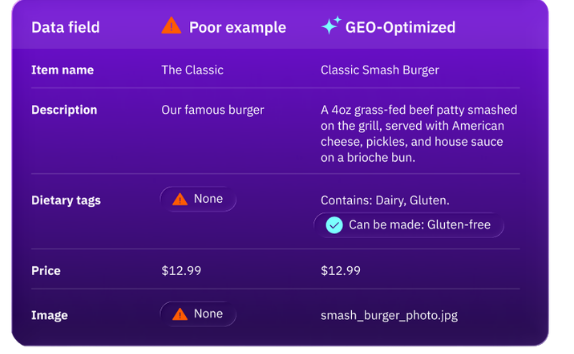
Based on our conversations with Rev, a menu that is optimized for both human readers and AI discovery should include the following elements for every item:
1. Structuring Every Item in Your Menu
Every single item on your menu must have:
- A clear name
- A detailed description, including key ingredients, preparation methods, flavor profiles (the contextual info humans and LLMs appreciate)
- Accurate dietary/allergen tags – such as "gluten-free," "dairy-free"
- High-quality photos for key menu items, since visual content helps humans make decisions and gives AI systems extra context
- Prices – this helps consumers who are using budget-related queries to find their next meal
You've got menu-specific structured data as well to help you provide search engines and AI systems with extra information:
- Menu (for your overall menu)
- MenuItem (for individual dishes)
- MenuSection (for groupings like "Starters," "Lunch," or "Vegetarian")
2. Embed Keywords in Your Menu Naturally
Rev recommends writing descriptions that include the locally relevant keywords customers actually use – for example, "crispy chicken sandwich" or "spicy margarita."
So align your dish names with these popular search terms, while providing complementary, specific descriptions like those mentioned above. You want to give your menu personality and stay on-brand, reflecting your unique flavors, while being instantly recognizable and recommendable by consumers and search systems.
| Before | After |
|---|---|
| The Classic | Classic Smash Burger |
| Our famous burger | A 4OZ grass-fed beef patty smashed on the grill, served with American cheese, pickles, and house sauce on a brioche bun. |
3. Maintain Menu Consistency Across Every Platform
Prioritize promoting your menu across multiple directories for the best AI search coverage. Various AI models fetch information from a wide variety of sources before recommending them — and models also favor data from different time frames. The best practice for LLM visibility is therefore always directory diversity.
This means, however, that your pricing, seasonal availability, and item descriptions need to stay current everywhere your menu appears. Whether that's on your website, Google Business Profile, Yelp, TripAdvisor, OpenTable, delivery apps, and any other discovery platform.
If AI recommends a dish you no longer serve or shows the wrong price, that's a bad customer experience before the customer even walks in.
This is where it gets hard for operators managing multiple locations. Each location may have slight menu variations, different pricing, or different seasonal offerings — and all of that needs to be accurate across every platform, every day. This is exactly why location-specific restaurant menu optimization matters and why finding a centralized listings management system matters too to keep structured data consistent.
From Menu Visibility to Real Location Performance
For years, operators in the restaurant space have turned to us for help with local search optimization, brand consistency, managing online reviews, and finding the time to scale these optimizations. And now there's this GEO perspective to think about.
Getting your menu in front of the right consumers is a solid start. But visibility doesn't equal visits. It doesn't equal seeing real customers sitting down at your tables enjoying good food.
Optimizing your performance across your locations at scale — for visibility, engagement, reputation, and conversions — is where your opportunity lies. It ensures you put your best foot forward everywhere consumers search to increase restaurant traffic, online and in-person. That's because customers see you, trust you, and are hungry for what you're offering.



1,800 brands trust us to stay visible
— not just show up once or twice in local search.




Frequently Asked Questions
You optimize your restaurant menu for Google search and AI discovery by structuring every item with a clear name, detailed description, dietary tags, and accurate pricing. Use search-friendly dish names customers actually type — like "crispy chicken sandwich" instead of a branded name. Add Menu schema markup and keep your menu consistent across your website, Google Business Profile, and directory listings.
Structured data you should add to your restaurant menu includes three Schema.org types: Menu for your overall menu, MenuItem for individual dishes, and MenuSection for groupings like "Starters" or "Vegetarian." These help search engines and AI systems read your offerings as structured fields rather than unstructured text, improving how your dishes surface in local and AI-driven results.
You add or update your restaurant menu on Google by signing into your Google Business Profile, selecting "Edit profile," then navigating to "Edit Menu." From there, you can add sections, individual items with descriptions and prices, and choose your preferred menu source. Enter menu details as text rather than uploading a PDF image so that both search engines and customers can read them.
Menu consistency across platforms matters because AI models and search engines pull restaurant data from multiple sources — your website, Google Business Profile, Yelp, delivery apps, and other directories. If pricing, availability, or descriptions differ across these platforms, it weakens trust signals and can lead to wrong recommendations before a customer even walks in. A centralized listings management approach keeps everything accurate.
Restaurant groups improve their AI search visibility by ensuring business data is complete, accurate, and consistent across every platform AI models pull from. More than two in three brands are missing from AI recommendations due to gaps in their data. A GEO-optimized menu with structured descriptions, dietary tags, and schema markup gives AI systems the specific detail they need to recommend your locations over competitors.
Your restaurant menu should be an HTML page, not a PDF. Search engines and AI assistants struggle to parse menus published as images or PDFs, which makes your dishes invisible to queries like "gluten-free pasta near me." An HTML menu with real, crawlable text lets Google index individual items and lets AI systems cite your offerings. You can still link to a formatted PDF as a supplement, but the primary menu should live as structured web content.
The most important elements to include in each menu item are a clear, keyword-aligned name, a detailed description covering key ingredients and preparation method, accurate dietary and allergen tags (e.g., "gluten-free," "dairy-free"), a price, and a high-quality photo. These details help both customers and search systems understand exactly what you serve and surface your dishes in specific queries.
Generative engine optimization applies to restaurant menus because AI answer engines like ChatGPT and Gemini assemble recommendations from structured, specific data fields — not from scanning a static PDF. A GEO-ready menu includes detailed descriptions, dietary tags, and schema markup so AI systems can match your dishes to queries like "vegan tacos near me." Directory diversity strengthens this further across models.